Introduction: The Intersection of Empathy and Design
Welcome, future designers, to the most critical stage of your NIFT journey—the Situation Test. As a panelist who has evaluated thousands of models, I can tell you that this round is not a craft competition; it is a test of your problem-solving mindset and social sensibility. The topic of ‘A Gadget for the Elderly to assist with Memory’ is a classic favorite because it tests your ability to design for a demographic with specific physical and cognitive needs.
In this masterclass, we will delve into the nuances of creating a 3D model that doesn’t just look good but actually functions as a solution. We will explore the critical domains of ergonomics, cognitive triggers, and the art of the technical write-up. Remember, at NIFT, we don’t just look for artists; we look for designers who can change lives through thoughtful intervention.
💡 Pro-Tip: The ‘Why’ over the ‘What’
The examiners are less interested in the neatness of your glue work and more interested in the logic behind your design choices. Always ask yourself: ‘Why did I choose this specific shape or color for an elderly user?’
The Panelist’s Secret: Evaluation Criteria Revealed
What goes on in the mind of an evaluator when they walk past your table? We use a structured rubric to score your performance. If you understand these criteria, you can align your model to fetch maximum marks.
- Conceptualization (20%): How original is your idea? Did you create a simple alarm, or a holistic memory anchor?
- Material Management (20%): Did you use all provided materials effectively? Did you transform a flat sheet of paper into a dynamic 3D form?
- Ergonomics (25%): Is the gadget easy to hold for a person with arthritis? Are the buttons accessible?
- Cognitive Triggers (15%): How does the gadget help the brain remember? Is it through color, sound, or texture?
- The Write-up (20%): Is your explanation technical, clear, and empathetic?
Common Pitfall: Many students focus so much on the model that they leave only five minutes for the write-up. In the eyes of the panel, a beautiful model without a conceptual explanation is an incomplete design.
Deep Dive: Ergonomics for the Elderly
Design for the elderly requires an understanding of Gerontechnology. When creating your memory gadget, you must incorporate ergonomic features that cater to aging bodies.
1. Anthropometrics and Grip
Elderly users often struggle with fine motor skills. Avoid tiny buttons or thin handles. Instead, use ‘power grips’—larger, contoured shapes that the whole hand can wrap around. If your gadget is a handheld device, ensure it has a textured surface to prevent slipping.
2. Visual Legibility
Eyesight often declines with age (Presbyopia). Use high-contrast colors (e.g., yellow buttons on a dark blue base) and avoid pastels which may bleed into each other for someone with cataracts. In your 3D model, represent text with bold, raised surfaces rather than just drawing with a pen.
3. Tactile Feedback
Since hearing and sight might be diminished, the sense of touch becomes a primary interface. Incorporate ‘haptic’ elements. For example, a button that clicks loudly or a surface that changes texture when an action is completed serves as a physical confirmation to the user.
💡 Design Challenge Quiz
Why should you avoid using touchscreens in a 3D model for the elderly? Answer: Touchscreens lack tactile feedback and can be frustrating for those with tremors or dry skin. Physical, tactile buttons are always a superior ergonomic choice for this demographic.
Cognitive Triggers: Anchoring the Memory
Memory assistance gadgets don’t just ‘tell’ the time; they ‘remind’ through associations. When building your model, consider these three triggers:
- Color Coding: Use red for urgent tasks (medication), green for routine (walks), and blue for social connections (calling family).
- Auditory Cues: Represent speakers or chime-points on your model. Explain in your write-up how different tones correspond to different tasks.
- Sensory Anchors: If the gadget is meant to remind them of home, maybe it incorporates a familiar shape, like a traditional pocket watch form factor, which triggers long-term memory.
“Design is not just what it looks like and feels like. Design is how it works.” – This quote should be your mantra when building cognitive solutions for seniors.
Step-by-Step Model Construction Strategy
You have 3 hours. Time management is your greatest asset. Follow this disciplined approach:
Phase 1: Ideation & Sketching (15 Minutes)
Do not touch the materials yet. Sketch three quick thumbnails. Choose the one that has the best ergonomic balance. Decide on your ‘Hero Material’ (the material that will form the bulk of your gadget).
Phase 2: Skeleton Construction (45 Minutes)
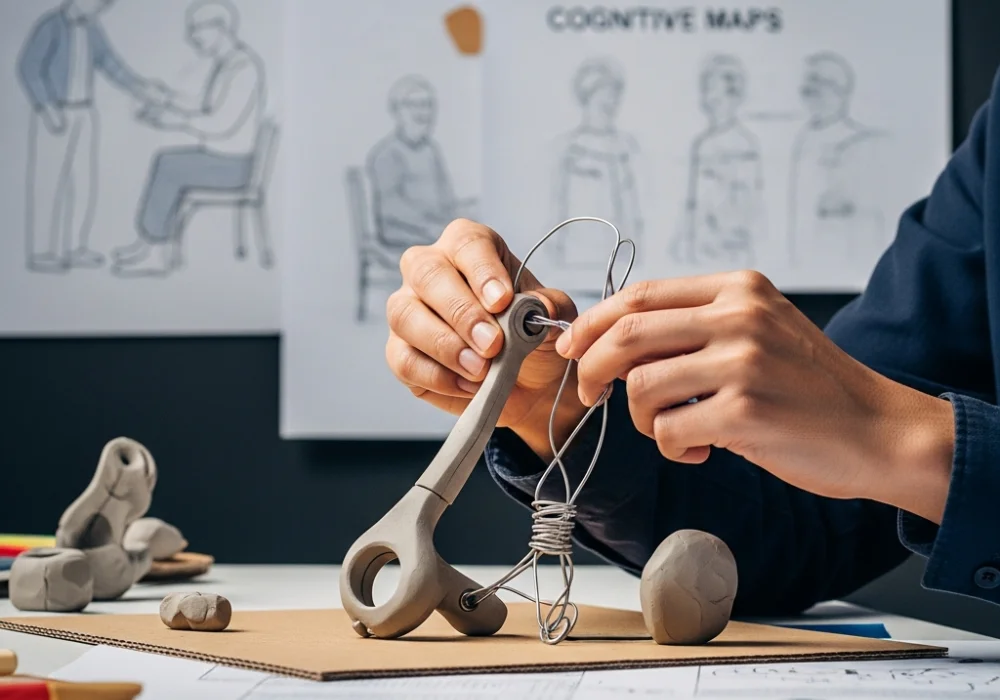
Build the core structure. If it’s a wearable, use wire to create the frame. If it’s a tabletop device, use corrugated cardboard for the base. Ensure the structure is sturdy; if it falls apart during the examiner’s touch, it loses marks.
Phase 3: Detailing & Aesthetics (1 Hour 15 Minutes)
This is where you add the buttons, the textures, and the color coding. Use clay for organic shapes (ergonomic grips) and tinted cellophane for screens. Use sandpaper to create ‘anti-slip’ textures.
Phase 4: The Write-up (45 Minutes)
Write your explanation while the glue dries. Do not rush this. It is your only chance to speak to the panelist when you aren’t there.
💡 Material Handling Hack
Need to make a perfect curve with cardboard? Score the back of the sheet with a cutter (lightly) every 5mm. It will wrap around a cylindrical object perfectly without creasing!
The Master Write-up: Structuring Your Explanation
Your write-up is the blueprint of your mind. For a gadget for the elderly, structure it as follows:
1. Problem Statement
Briefly describe the struggle of the elderly with short-term memory and how it affects their independence.
2. Design Concept
Introduce your gadget name (e.g., ‘The Memento Orb’). Explain the central theme—is it based on ‘Nostalgia’, ‘Security’, or ‘Simplicity’?
3. Ergonomic Integration
Explicitly mention: “I have used a bulbous handle to accommodate limited finger dexterity” or “High-contrast UI was used for visual clarity.”
4. Cognitive Strategy
Explain how the gadget works. “The device uses a rhythmic pulse (haptics) to remind the user of water intake, reducing the cognitive load of remembering numbers.”
5. Material Rationale
Explain why you used specific materials. “Straws were used to represent the internal wiring, symbolizing the connectivity of memory.”
Final Tips for the Big Day
As you prepare for the latest NIFT entrance round, keep these final panelist observations in mind:
- Neatness: While the idea is king, messy glue marks indicate a lack of discipline. Keep a damp cloth to wipe your hands.
- Safety: Do not use materials in a way that creates sharp edges. In a gadget for the elderly, sharp edges are a design failure.
- Sustainability: If you can show that your gadget is ‘rechargeable’ or made of ‘sustainable materials’ in your write-up, you earn brownie points for being a conscious designer.
The Situation Test is your canvas. Treat it with the respect a professional designer would. Good luck!
Need personalized feedback on your 3D models?
Our experts are here to help you crack the NIFT Situation Test with ease!
💬 Chat with our Experts on WhatsApp (+91 9526806124)