Understanding Computer Memory Classification for Kerala PSC
In the realm of Information Technology for competitive exams like the Kerala PSC Secretariat Assistant, LDC, and KAS, a profound understanding of computer memory is non-negotiable. Memory is essentially the internal storage area in a computer, used to store data and instructions either temporarily or permanently. As an expert examiner, I have observed that questions often center on the fundamental distinction between volatile and non-volatile states, the hierarchy of speed versus capacity, and the specific technological implementations like SRAM and EEPROM. This guide breaks down these complex hierarchies into digestible segments designed for maximum recall during high-pressure exams. Understanding the hardware fundamentals is the first step toward securing high marks in the IT section.
🚀 Key Takeaways
- Primary vs. Secondary: Primary memory (RAM/ROM) is directly accessible by the CPU, while Secondary memory (HDD/SSD) is for long-term storage.
- Volatility: Volatile memory loses data when power is cut (RAM); Non-volatile memory retains it (ROM, Hard Disks).
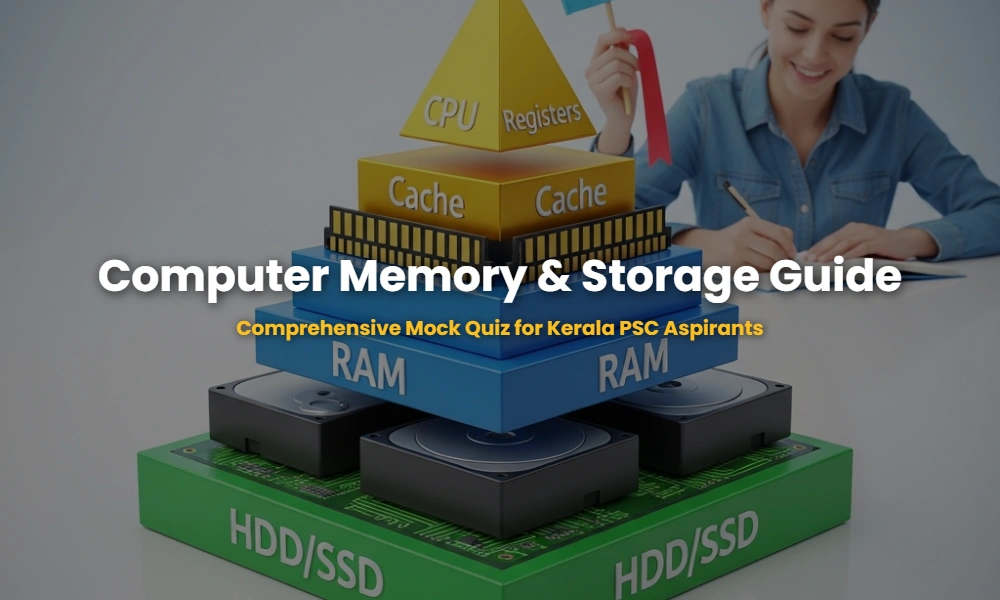
- The Hierarchy: Registers are the fastest but smallest, followed by Cache, RAM, and finally Secondary Storage which is the slowest but largest.
- Memory Units: Knowledge of bits, bytes, KB, MB, GB, TB, and PB is crucial for calculation-based questions.
Table of Contents
What is the Classification of Computer Memory?
Computer memory classification is the systematic categorization of storage based on its proximity to the CPU, its volatility, and its operational speed. It is primarily divided into three levels: Internal Memory (Registers/Cache), Primary Memory (Main Memory/RAM), and Secondary Memory (Auxiliary Storage like SSDs and Hard Drives).
When preparing for Kerala PSC, you must focus on the Memory Hierarchy. At the apex are the CPU Registers, which provide the fastest data access. Just below them is Cache memory, designed to bridge the speed gap between the high-speed processor and the relatively slower RAM. The IT and computer architecture syllabus emphasizes that as we move down the hierarchy, cost per bit decreases while capacity and access time increase. Secondary memory, although much slower, is essential for data persistence, ensuring that your operating system and files are available every time you boot the system.
💡 Examiner Tip: SRAM vs DRAM
Kerala PSC often asks which memory needs refreshing. The answer is DRAM (Dynamic RAM) because it uses capacitors that leak charge. SRAM (Static RAM) uses flip-flops and doesn’t need refreshing, making it faster and more expensive, typically used for Cache.
Volatile vs. Non-Volatile Memory: The Core Difference
Volatile memory is a type of computer storage that requires a continuous power supply to maintain its stored information. Non-volatile memory, conversely, is capable of retaining stored data even after the power source is removed, making it ideal for permanent storage of the BIOS and user files.
To simplify this for the exam: Think of Volatile Memory as a chalkboard where the writing is wiped clean every time the lights go out. RAM (Random Access Memory) is the primary example. It is used to hold the data currently being processed by the CPU. On the other hand, Non-Volatile Memory is like a book; once the information is written, it stays there. Examples include ROM, Flash Memory, and Hard Disks. In recent years, Solid State Drives (SSDs) have become the standard for non-volatile storage due to their lack of moving parts and superior speed over traditional Hard Disk Drives (HDDs). For more on technological trends, check our previous year questions on storage hardware.
| Feature | Volatile Memory | Non-Volatile Memory |
|---|---|---|
| Power Dependency | Loses data without power | Retains data without power |
| Speed | Extremely Fast | Relatively Slower |
| Examples | RAM, Cache, Registers | ROM, HDD, SSD, Flash |
| Usage | Temporary work space | Permanent storage |
Kerala PSC Mock Quiz: Computer Memory & Storage
This interactive quiz is designed to mimic the difficulty level of the Kerala PSC exams. Test your knowledge on memory classification, volatile vs non-volatile types, and technical acronyms used in storage technology.
Q1. Which of the following is considered the fastest memory in a computer system?
Q2. Which type of ROM can be erased by exposing it to ultraviolet light?
Q3. Virtual memory is typically located on which part of the computer hardware?
Q4. Which of these is a volatile type of memory?
Q5. Which memory type uses flip-flops and does not require periodic refreshing?
Q6. BIOS (Basic Input Output System) is stored in which type of memory?
Q7. What is the correct sequence of memory units from smallest to largest?
Q8. Which secondary storage device uses a laser beam to read and write data?
Q9. EEPROM stands for:
Q10. What is the main advantage of SSD over HDD?
Expert Insights: Memory & Exam Strategy
To excel in Kerala PSC exams, candidates should focus on the technical nuances of each memory type. For instance, knowing that Cache Memory operates on the principle of “locality of reference” can help in understanding why it significantly boosts system performance. Similarly, the distinction between Sequential Access (Magnetic Tapes) and Direct Access (RAM/HDD) is a frequent exam topic. Make sure to keep updated with modern storage trends, such as NVMe (Non-Volatile Memory Express) which is the current cutting-edge technology for SSDs.
💡 Frequently Asked Question (FAQ)
Is Flash Memory Volatile? No, Flash Memory (used in USB drives and SSDs) is a type of EEPROM and is non-volatile, meaning it retains data without power.
Need Personal Guidance for Kerala PSC?
Join our expert-led coaching sessions to master Information Technology and secure your dream government job!
💬 Chat with our Experts on WhatsApp (+91 9526806124)